
SeeUnity Vortex Content Mobility for iPhone2.2 - App Store
You'll be able to see results in few seconds.
Publisher Description
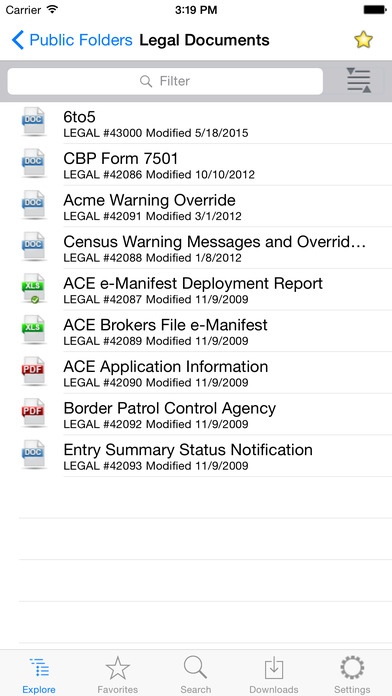
SeeUnity Vortex Content Mobility for iPhone is an ECM Client for OpenText eDOCS DM, Content Server, iManage Work, and Microsoft SharePoint. Access documents from one or many libraries from the same, simple, easy to use interface. Features include:
DOCUMENT MANAGEMENT:
- Access one or many eDOCS document libraries including, File Plans, Public Folders, Workspaces, Quick Searches, and Dynamic Views.
- Access one or many Content Server repositories including enterprise workspace, personal workspace, projects, and folders.
- Access one or many iManage repositories including Folders, Workspaces, and Tabs.
- Access SharePoint sites, sub-sites, and document libraries.
- View document content and meta-data, including eDOCS profile data, iManage profiles, and Content Server categories.
- Search eDOCS libraries using full-text and\or profiles without any additional server-side configuration. SeeUnity Mobile for iPhone reads existing eDOCS profiles.
- Search Content Server repositories on document content and\or category attributes.
- Search iManage database on document content and\or meta-data and workspaces.
- Maintain a quick access favorites list for any item including documents, folders, dynamics views, quick searches, etc.
- Download documents for offline access. Press one button to automatically refresh all local documents.
- View eDOCS, iManage, and Content Server history list.
APP INTEGRATION:
- Send documents to other apps using Open With
- Send documents or document links as e-mail attachments.
- Open documents from other applications (e-mail, editors, etc ).
- Documents from e-mail and other applications can be imported into eDOCS, Content Server, iManage, or SharePoint. Documents originally from eDOCS, Content Server, iMange, or SharePoint can update the original as a new version, sub-version, or replace content.
- View documents from SeeUnity SmartLinks, eDocs DRFs, and iManage NRLs.
SECURITY:
- Connect via HTTP or HTTPS.
- Optional warnings when sending documents via e-mail or Open With
- Downloaded documents are protected using the built-in hardware encryption.
Vortex Content Mobility for iPhone is available for free evaluation. The application offers full functionality, but connectivity is limited to our external SeeUnity demo system. To connect Vortex Content Mobility with your own eDOCS, Content Server, iManage, or SharePoint systems, a server license must be purchased from SeeUnity.
REQUIREMENTS: This application is designed to complement *existing* ECM systems (OpenText eDOCS DM, Content Server, iManage, and Microsoft SharePoint). If you don't have these applications, please DO NOT download this application. Vortex Content Mobility for iPhone does not include, offer or imply licenses to any 3rd-party software.
Requires iOS 7.1 or later. Compatible with iPhone, iPad, and iPod touch.
About SeeUnity Vortex Content Mobility for iPhone
The company that develops SeeUnity Vortex Content Mobility for iPhone is SeeUnity Inc.. The latest version released by its developer is 2.2.
To install SeeUnity Vortex Content Mobility for iPhone on your iOS device, just click the green Continue To App button above to start the installation process. The app is listed on our website since 2012-02-24 and was downloaded 0 times. We have already checked if the download link is safe, however for your own protection we recommend that you scan the downloaded app with your antivirus. Your antivirus may detect the SeeUnity Vortex Content Mobility for iPhone as malware if the download link is broken.
How to install SeeUnity Vortex Content Mobility for iPhone on your iOS device:
- Click on the Continue To App button on our website. This will redirect you to the App Store.
- Once the SeeUnity Vortex Content Mobility for iPhone is shown in the iTunes listing of your iOS device, you can start its download and installation. Tap on the GET button to the right of the app to start downloading it.
- If you are not logged-in the iOS appstore app, you'll be prompted for your your Apple ID and/or password.
- After SeeUnity Vortex Content Mobility for iPhone is downloaded, you'll see an INSTALL button to the right. Tap on it to start the actual installation of the iOS app.
- Once installation is finished you can tap on the OPEN button to start it. Its icon will also be added to your device home screen.
Program Details
System requirements
Download information
Pricing
Version History
version 2.2
posted on 2012-02-24
Disclaimer
Official App Store Link
We do not host SeeUnity Vortex Content Mobility for iPhone on our servers. We did not scan it for viruses, adware, spyware or other type of malware. This app is hosted by Apple and passed their terms and conditions to be listed there. We recommend caution when installing it.
The App Store link for SeeUnity Vortex Content Mobility for iPhone is provided to you by apps112.com without any warranties, representations or guarantees of any kind, so access it at your own risk.
If you have questions regarding this particular app contact the publisher directly. For questions about the functionalities of apps112.com contact us.
